As an Amazon Associate, we earn from qualifying purchases. Some links on this site are affiliate links at no extra cost to you. Our recommendations are based on thorough research and editorial judgment.


10 Best SD Card Adapters That Make Data Transfer a Breeze

To simplify your data transfer, choose reliable SD card adapters suited for your devices. Opt for a multi-format reader or a USB-C dual-slot option for quick transfers. Make sure it supports high-capacity cards like SDXC and microSDXC. The best adapters offer USB 3.0 speeds for fast performance, and some even provide plug-and-play usability for convenience. Pay attention to design and compatibility for maximum efficiency. Keep exploring to discover specific product recommendations tailored for your needs.
Key Takeaways
- Look for multi-format card readers that support various card types and provide simultaneous read/write capabilities for improved efficiency.
- Choose USB 3.0 or USB-C adapters for fast data transfer speeds up to 5Gbps, ensuring quick file movements.
- Select adapters with dual slots for SD and microSD cards to streamline your workflow and reduce switching between devices.
- Ensure compatibility with high-capacity cards like SDXC and microSDXC to accommodate large volumes of data.
- Opt for compact, portable designs that feature plug-and-play usability, making them user-friendly and easy to transport.
| SD Card Reader for iPhone and iPad | 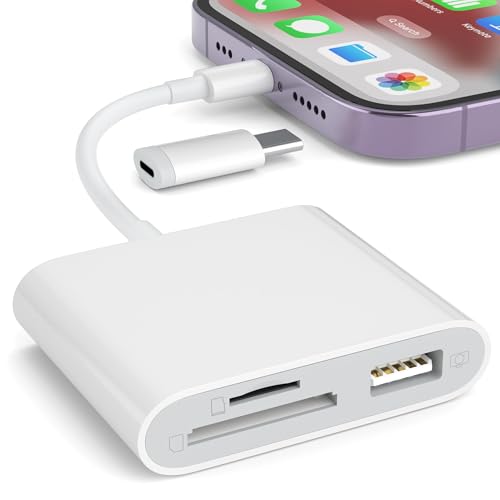 | Best for iPhone/iPad | Compatibility: iPhone (5-14) & iPad (with Lightning) | Data Transfer Speed: High-speed transfers for photos/videos | Design: Compact and portable | VIEW LATEST PRICE | Read Our Analysis |
| SanDisk MicroSD to SD Memory Card Adapter Black |  | Compact Converter | Compatibility: Standard SD slot devices | Data Transfer Speed: Not specified | Design: Slim design with write protection | VIEW LATEST PRICE | Read Our Analysis |
| BENFEI 4in1 USB 3.0 Card Reader Adapter |  | Fastest Data Transfer | Compatibility: MacBook, iPad Pro, Windows laptops | Data Transfer Speed: Up to 104MB/sec (UHS-I) | Design: 4-in-1 card reader with integrated design | VIEW LATEST PRICE | Read Our Analysis |
| WNXSLOAD USB-C SD Card Reader with Dual Slots |  | Ideal for Newer Devices | Compatibility: iPhone 15/16, iPad, Mac | Data Transfer Speed: Fast transfer speeds (not specified) | Design: Plug-and-play, portable design | VIEW LATEST PRICE | Read Our Analysis |
| Acer USB 3.0 Dual Slot SD Card Reader |  | Dual Slot Efficiency | Compatibility: Windows, macOS, Chrome OS, Linux | Data Transfer Speed: 5Gbps via USB-A 3.0 | Design: Slim aluminum, portable design | VIEW LATEST PRICE | Read Our Analysis |
| UGREEN 2 in 1 SD Card Reader for USB-C |  | Versatile Compatibility | Compatibility: PC, MacBook, iPad, iPhone 15/16/17 Pro/Pro Max | Data Transfer Speed: Up to 5Gbps | Design: Slim, lightweight, stylish design | VIEW LATEST PRICE | Read Our Analysis |
| USB-C SD Card Reader for iPhone and iPad |  | High-Speed Performance | Compatibility: iPhone 15/16 & USB-C devices | Data Transfer Speed: Up to 90MB/S (USB 3.0) | Design: Plug-and-play, no drivers needed | VIEW LATEST PRICE | Read Our Analysis |
| MaxRenard USB-C SD Card Reader for iPhone | 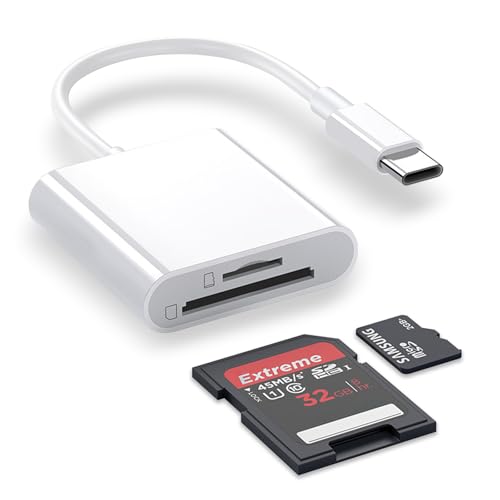 | User-Friendly Design | Compatibility: iPhone 15/16, iPad, MacBook | Data Transfer Speed: High-speed transfer (not specified) | Design: Durable ABS material, user-friendly design | VIEW LATEST PRICE | Read Our Analysis |
| BnmxTek USB-C to SD Card Reader Adapter |  | Multi-Functional Adapter | Compatibility: iPhone 15/16, iPad, MacBook, Chromebook | Data Transfer Speed: Supports high-speed cards for smooth transfers | Design: Compact with built-in USB-C cable | VIEW LATEST PRICE | Read Our Analysis |
| Memory Card Reader – 4 in 1 Adapter | 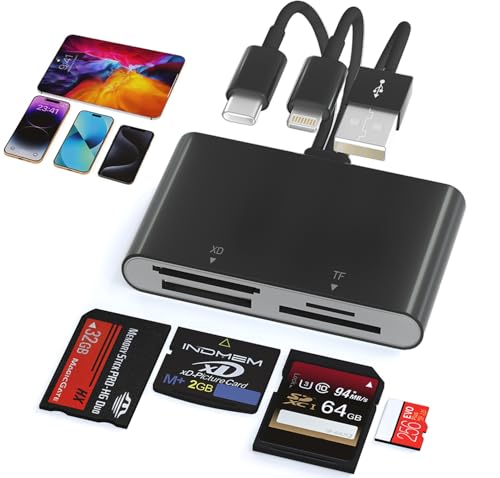 | All-in-One Solution | Compatibility: iPhone (15-17), iPad, PC, Android | Data Transfer Speed: Max speeds of 480 Mbps | Design: Compact, lightweight design | VIEW LATEST PRICE | Read Our Analysis |
You may be interested


More Details on Our Top Picks
SD Card Reader for iPhone and iPad
Looking for a fast and easy way to transfer photos and videos from your SD or MicroSD (TF) cards to your iPhone or iPad? The SD Card Reader designed for these Apple devices is just what you need. Check out its standout features:
- Quick Transfers: Simply connect the reader to your iPhone or iPad’s Lightning port and insert your memory card. You’ll be able to import your files in as little as five seconds!
- Two-Way Transfers: Enjoy seamless transfers of different types of files, including movies, music, and of course, photos and videos.
- User-Friendly: The straightforward setup means anyone can use it—no technical skills required!
- Portable & Lightweight: Carry it anywhere. This card reader is perfect for travel, allowing you to back up memories on the go.
Keep in mind, this reader is not compatible with printers or external hard drives. Avoid connecting those devices to ensure your reader remains safe and functional.
Ready to make your photo and video transfers hassle-free? Get your SD Card Reader today and enjoy effortless file management on your favorite Apple devices!
- Compatibility:iPhone (5-14) & iPad (with Lightning)
- Data Transfer Speed:High-speed transfers for photos/videos
- Design:Compact and portable
- Type of Slots:SD and TF (MicroSD) cards
- Plug-and-Play:Yes, no app required
- Support for Multiple Formats:Supports JPEG, RAW, H.264, MPEG-4
- Additional Feature:Plug-and-play functionality
- Additional Feature:Two-way data transfer
- Additional Feature:Compact design
SanDisk MicroSD to SD Memory Card Adapter Black
Introducing the SanDisk MicroSD to SD Memory Card Adapter, the perfect companion for anyone who needs to transfer data seamlessly between devices with standard SD slots—like your camera or laptop.
Key Features:
- Easy to Use: Simply insert your MicroSD card into the adapter. It’s a quick and hassle-free process.
- Write Protection Switch: Keep your data safe during transfers with the built-in write protection switch. Always remember to check it for peace of mind.
- Wide Compatibility: Works with a variety of devices, ensuring you can access your data anywhere you need it.
- Compact Design: Small and lightweight, this adapter fits easily into your pocket or bag, ready for whenever you need it.
Why You’ll Love It:
- Effortlessly transfer photos and files with this reliable adapter.
- Protect your important data during transfers—no more worries!
- Stay mobile and organized with a device that travels well.
Don’t miss out on this essential accessory. Get your SanDisk MicroSD to SD Memory Card Adapter today, and enjoy the convenience it brings to your data transfer needs!
- Compatibility:Standard SD slot devices
- Data Transfer Speed:Not specified
- Design:Slim design with write protection
- Type of Slots:MicroSD to SD adapter
- Plug-and-Play:Yes, no drivers needed
- Support for Multiple Formats:MicroSD cards only
- Additional Feature:Built-in write protection switch
- Additional Feature:Represents MicroSD card only
- Additional Feature:Lightweight and portable
BENFEI 4in1 USB 3.0 Card Reader Adapter
Upgrade your data transfer experience with the BENFEI 4in1 USB 3.0 Card Reader Adapter. This compact device is designed to effortlessly handle multiple card types, making it a must-have for photographers, videographers, and anyone who frequently transfers data.
Key Features:
- Versatile Compatibility: Supports SD, Micro SD, MS, and CF card formats.
- Simultaneous Read/Write: Access data from four different cards at the same time.
- Fast Transfer Speeds: Achieve transfer rates up to 104MB/sec in UHS-I mode. Perfect for quick HD movie transfers!
- Dual Connectivity: Connect easily using USB 3.0 or USB-C.
- SDXC Ready: Note that SDXC cards (64GB or larger) need to be formatted in exFAT for optimal performance.
Benefits to You:
- Streamlined Workflow: Save time by transferring multiple files at once.
- Efficient Data Management: Handle your media effortlessly and stay organized.
- Peace of Mind: Enjoy an 18-month warranty for added assurance on your investment.
Don’t let slow transfers stall your creativity. Grab the BENFEI 4in1 USB 3.0 Card Reader Adapter today and experience seamless data handling!
- Compatibility:MacBook, iPad Pro, Windows laptops
- Data Transfer Speed:Up to 104MB/sec (UHS-I)
- Design:4-in-1 card reader with integrated design
- Type of Slots:SD, MicroSD, MS, CF
- Plug-and-Play:Yes, plug-and-play functionality
- Support for Multiple Formats:Supports various card formats (SD, MicroSD, etc.)
- Additional Feature:Simultaneous reading/writing
- Additional Feature:UHS-I mode support
- Additional Feature:Advanced IC chip
WNXSLOAD USB-C SD Card Reader with Dual Slots
Are you tired of struggling to transfer photos and videos from your camera or smartphone? The WNXSLOAD USB-C SD Card Reader with dual slots is your solution!
Key Features:
- Dual Slots: Easily supports both SD and microSD cards.
- Plug-and-Play: No need for downloads or drivers—just plug it into your device and go!
- Wide Compatibility: Works seamlessly with iPhone 15 and 16, various iPads, and MacBooks.
- Fast Transfers: Optimize your media transfer speeds from Kodak, Canon, and Nikon cameras.
Benefits:
- Save time and hassle while moving your favorite photos and videos.
- Access your media directly through iOS’s built-in Photos app for quick viewing.
- Ensure compatibility, but keep in mind it does not work with XD or MS cards.
Don’t let slow transfers hold you back! Get your WNXSLOAD USB-C SD Card Reader today and enjoy effortless media transfer. It’s the perfect tool for photographers and content creators on the go!
- Compatibility:iPhone 15/16, iPad, Mac
- Data Transfer Speed:Fast transfer speeds (not specified)
- Design:Plug-and-play, portable design
- Type of Slots:SD and microSD dual slots
- Plug-and-Play:Yes, plug-and-play design
- Support for Multiple Formats:Supports SD/SDHC/microSD/microSDHC/microSDXC
- Additional Feature:Optimized for DSLRs
- Additional Feature:Fast media transfer speeds
- Additional Feature:Portable for quick use
Acer USB 3.0 Dual Slot SD Card Reader
Whether you’re a photographer on a shoot or a content creator managing files, the Acer USB 3.0 Dual Slot SD Card Reader is the tool you need. This efficient and sleek device makes data transfer a breeze. Here’s why you should consider it:
- Dual Slot Design: Read and write to both SD and Micro SD cards simultaneously. Save time by efficiently managing your data.
- Fast Transfer Speeds: Experience lightning-fast transfers with USB 3.0 speeds up to 5Gbps. No more long waits when moving files.
- Portable and Lightweight: Its slim, aluminum body means you can easily slip it into your bag. Take it wherever you go without the extra bulk.
- USB-A Compatibility: Simple plug-and-play via the USB-A interface. Note: This device does not support USB-C or Lightning connections—check your device compatibility before purchasing.
Maximize your productivity with the Acer USB 3.0 Dual Slot SD Card Reader. Upgrade your data transfer process today!
- Compatibility:Windows, macOS, Chrome OS, Linux
- Data Transfer Speed:5Gbps via USB-A 3.0
- Design:Slim aluminum, portable design
- Type of Slots:Dual slots for SD and MicroSD
- Plug-and-Play:Yes, no power needed
- Support for Multiple Formats:SD, SDXC, SDHC, MMC, RS-MMC formats
- Additional Feature:Slim aluminum body
- Additional Feature:Dual slot functionality
- Additional Feature:Universal device compatibility
UGREEN 2 in 1 SD Card Reader for USB-C
Introducing the UGREEN 2 in 1 SD Card Reader for USB-C—your ideal companion for capturing and sharing life’s moments. Perfect for photographers, videographers, and content creators, this compact reader lets you access your media files quickly and efficiently.
Key Features:
- Fast Data Transfer Speeds: Enjoy blazing speeds up to 5Gbps. Transfer large files like stunning 4K footage in no time.
- Dual Functionality: Read both SD and microSD cards simultaneously. Save time and streamline your workflow.
- Plug and Play: No drivers needed. Just plug it into your device and start transferring files right away.
- Compact Design: Lightweight and portable, it easily fits in your bag. Take it with you wherever you go.
- Universal Compatibility: Works seamlessly with a range of devices. Perfect for any scenario.
Benefits for You:
- Save Time: With rapid data transfers, spend less time waiting and more time creating.
- Enhance Productivity: Dual card reading allows efficient management of multiple media cards at once.
- Reliable and Secure: Minimize the risk of data loss with a trusted tool designed for professionals.
Don’t let cumbersome transfers slow you down. Invest in the UGREEN 2 in 1 SD Card Reader today and elevate your media handling experience. Click to get yours now!
- Compatibility:PC, MacBook, iPad, iPhone 15/16/17 Pro/Pro Max
- Data Transfer Speed:Up to 5Gbps
- Design:Slim, lightweight, stylish design
- Type of Slots:2-in-1 for MicroSD and SD
- Plug-and-Play:Yes, no drivers needed
- Support for Multiple Formats:Multiple card formats: SDXC, SDHC, MicroSD
- Additional Feature:Stylish, lightweight design
- Additional Feature:Simultaneous SD/microSD reading
- Additional Feature:Supports 4K file transfers
USB-C SD Card Reader for iPhone and iPad
Manage your photos and videos effortlessly with the USB-C SD Card Reader for iPhone and iPad. Designed for creators on the go, this essential accessory helps you streamline your workflow.
Key Features:
- Broad Compatibility: Works with SD, SDHC, and SDXC formats. Perfect for connecting to your GoPro or Olympus camera.
- Lightning-Fast Transfers: Enjoy data speeds of up to 90MB/S—five times faster than standard USB 2.0.
- Easy Setup: No drivers needed. Just plug and play to start transferring your files.
- Device Support: Make sure your device has OTG functionality to protect against potential damage and data loss.
Benefits:
- Quickly download all your images and videos, so you can start editing right away.
- Stay organized and keep your creative projects moving forward without delay.
Don’t let slow transfers hold you back. Get the USB-C SD Card Reader today and keep your creative momentum going!
- Compatibility:iPhone 15/16 & USB-C devices
- Data Transfer Speed:Up to 90MB/S (USB 3.0)
- Design:Plug-and-play, no drivers needed
- Type of Slots:SD, SDHC, SDXC, UHS-I, UHS-II
- Plug-and-Play:Yes, no additional software required
- Support for Multiple Formats:Supports various formats (SD, SDHC, SDXC)
- Additional Feature:USB 3.0 Super Speed
- Additional Feature:Suitable for diverse cameras
- Additional Feature:Requires FAT32/exFAT format
MaxRenard USB-C SD Card Reader for iPhone
MaxRenard USB-C SD Card Reader for iPhone
Are you a photographer or content creator constantly managing large files? This USB-C SD Card Reader is perfect for you! Compatible with iPhone 15/16, iPad, and MacBook, it streamlines your workflow with ease.
Why You’ll Love It:
- Dual Slots for Versatility: Supports both SD and MicroSD cards. Easily switch between formats for all your media.
- Fast Data Transfer: Experience bidirectional high-speed transfer. Quickly upload photos or back up your files without delays.
- Durable Design: Made from robust ABS and TPE materials. Built to last and withstand daily use.
- User-Friendly: Simple plug-and-play functionality. No complicated setup—get started in seconds!
- Secure Connections: Always check your connections to avoid data loss. Keep your precious memories safe!
Stop struggling with your media files. Get the MaxRenard USB-C SD Card Reader today and enhance your productivity! Your photography and videography journey starts here.
- Compatibility:iPhone 15/16, iPad, MacBook
- Data Transfer Speed:High-speed transfer (not specified)
- Design:Durable ABS material, user-friendly design
- Type of Slots:SD, SDHC, SDXC, MicroSD/MicroSDXC/MicroSDHC
- Plug-and-Play:Yes, easy plug-and-play
- Support for Multiple Formats:Various SD and MicroSD formats
- Additional Feature:Enhanced built-in chip
- Additional Feature:High-toughness TPE cable
- Additional Feature:User-friendly design
BnmxTek USB-C to SD Card Reader Adapter
Looking for a reliable way to transfer files from your SD cards to your favorite devices? The BnmxTek USB-C to SD Card Reader Adapter is the answer. Check out its key features:
- Compatibility: Works seamlessly with iPhone 15/16 series, iPad Pro, and MacBook.
- Format Support: Accepts SD and MicroSD cards, including SDHC and SDXC formats.
- Effortless Use: Just insert your card into the slot and plug in the USB-C connector—no extra software needed.
- Fast Transfers: Enjoy quick file transfers to boost your productivity.
Take control of your data management—remember that you can only use one slot at a time.
Ready to enhance your file transfer experience? Get your BnmxTek USB-C to SD Card Reader Adapter today and streamline your workflow!
- Compatibility:iPhone 15/16, iPad, MacBook, Chromebook
- Data Transfer Speed:Supports high-speed cards for smooth transfers
- Design:Compact with built-in USB-C cable
- Type of Slots:SD, SDHC, SDXC, Micro SD
- Plug-and-Play:Yes, no drivers/software needed
- Support for Multiple Formats:Multiple formats including SD and MicroSD
- Additional Feature:Built-in USB A port
- Additional Feature:Compact with integrated cable
- Additional Feature:Quick access to files
Memory Card Reader – 4 in 1 Adapter
Looking for a reliable way to access all your memory cards? The 4-in-1 SD/MicroSD/MS/XD Card Reader from Ardaddyn is your go-to solution! Check out why this adapter is a must-have for anyone needing versatile compatibility.
Key Features:
- Multi-Device Compatibility: Connect to iPhone, iPad, PCs, Android devices, and cameras effortlessly.
- Versatile Ports: Equipped with Lightning, USB-C, and USB-A for seamless connections.
- High-Speed Transfers: Enjoy lightning-fast transfer rates of up to 480 Mbps for large media files.
- Compact & Durable Design: Take it anywhere without worrying about wear and tear.
Benefits for You:
- Effortlessly manage and transfer files from various memory cards.
- Avoid data loss by ensuring you insert your cards correctly.
- Encountering format issues on Android? Back up files and format the card to FAT32 to protect your data.
Don’t let your memory cards sit unused. Get the 4-in-1 Card Reader today and streamline your file management! Click here to pick one up now!
- Compatibility:iPhone (15-17), iPad, PC, Android
- Data Transfer Speed:Max speeds of 480 Mbps
- Design:Compact, lightweight design
- Type of Slots:SD/TF/XD/MS (multiple types)
- Plug-and-Play:Yes, no drivers required
- Support for Multiple Formats:Supports multiple card types (SD, MicroSD, etc.)
- Additional Feature:3-in-1 multi-port design
- Additional Feature:Efficient heat dissipation
- Additional Feature:Quick setup experience
Factors to Consider When Choosing an SD Card Adapter
When choosing an SD card adapter, you need to look at several important factors. First, make certain it’s compatible with your devices and supports the specific card types you plan to use. Next, consider the data transfer speed and the adapter’s form factor, as a well-designed adapter can help prevent damage and enhance your overall experience.
Compatibility With Devices
Selecting the right SD card adapter is vital for guaranteeing your devices function at their best, so analyze the compatibility factors before making a choice. Begin by confirming that the adapter supports your specific card type, whether it’s SD, microSD, or another format. Next, check compatibility with your devices by looking at the connectivity ports, such as Lightning, USB-C, or USB-A. It’s also important to verify that the adapter works with your operating system—Windows, macOS, or Linux. Don’t overlook capacity; confirm the adapter can handle high-capacity cards like SDXC or microSDXC. Finally, consider additional features like dual slots, which allow for reading and writing from multiple cards simultaneously, maximizing your workflow efficiency.
Data Transfer Speed
Understanding data transfer speed is essential because it directly impacts how quickly you can move files between your SD card and devices. Choose USB 3.0 adapters for transfer rates up to 5Gbps, considerably speeding up large file transfers. Check the rated speed, often measured in MB/sec—look for adapters supporting UHS-I mode for speeds of up to 104MB/sec, perfect for high-resolution files. Remember, the actual speed may vary based on the specific SD card and the USB version of your device’s port. If you juggle multiple cards, consider dual-slot adapters to enhance efficiency. For professionals, verify your adapter is compatible with UHS-II cards, maximizing those high-speed transfers essential for large media files.
Form Factor and Design
Choosing the right form factor and design for your SD card adapter isn’t just about aesthetics; it directly influences functionality and convenience. Opt for a compact design if portability is your priority, as it easily fits in your pocket. However, larger adapters may provide extra connectivity options, enhancing versatility. Look for plug-and-play features, which eliminate the need for additional software, making your experience smoother. If you handle different memory formats, consider adapters with dual slots to accommodate various cards at once. Prioritize durability by selecting adapters made from stronger materials to withstand wear during transport. Finally, verify compatibility with your device ports, such as USB-A, USB-C, or Lightning, to guarantee seamless integration and prevent any connectivity issues.
Supported Card Types
When evaluating an SD card adapter, it’s essential to guarantee it supports the specific card types you’ll be using, such as SD, SDHC, SDXC, and MicroSD. Check if the adapter accommodates other formats like MS, CF, or XD cards, as this adds versatility for multiple devices. Remember, compatibility with various memory card capacities is vital; SDXC cards handle larger storage sizes than SD and SDHC, which have lower limits. Opt for adapters with dual or multi-slot designs to access different card types simultaneously, improving data transfer efficiency. Finally, verify that the adapter features write protection switches. This helps secure your data during transfers, preventing accidental loss or damage to your important files.
Additional Features Offered
Several factors can greatly influence your choice of an SD card adapter, and understanding these additional features helps guarantee you pick the right one for your needs. Look for built-in write protection switches to safeguard your data during transfers. Choose adapters with plug-and-play functionality to avoid the hassle of installing drivers or software. If you frequently transfer large files, select models that support simultaneous reading and writing of multiple cards for enhanced efficiency. High-speed data transfer rates, like up to 104MB/sec in UHS-I mode, can considerably reduce your upload or download time. Finally, opt for compact and portable designs to easily access your data on the go, ensuring that you never miss an important moment.
Frequently Asked Questions
What Is the Maximum Data Transfer Speed for These Adapters?
The maximum data transfer speed for SD card adapters typically reaches up to 300 MB/s, depending on the adapter’s specifications and the card itself. To achieve ideal speeds, make sure you’re using a UHS-II card with a compatible adapter. Always check for any compatibility issues, as using an incompatible adapter might lead to slower transfer rates or even card damage. Regularly update your devices to enhance performance and prevent data loss.
Are These Adapters Compatible With All SD Card Formats?
Not all adapters work with every SD card format. Make certain you check compatibility specifications before purchasing. Standard SD, SDHC, and SDXC cards require different adapters, so confirm your card’s type. Misusing an adapter can damage your card or data. If you’re unsure, choose one that explicitly lists support for a range of formats. Always follow the manufacturer’s instructions closely to avoid issues and guarantee safe, effective data transfer.
Do I Need Additional Software for These Adapters to Work?
No, you won’t need additional software for these adapters to work. Just plug the adapter into your device and insert the SD card. Verify it’s compatible to avoid damaging your files. Some systems may take a moment to recognize the card, so be patient. If it doesn’t show up, try a different port or restart your device. Adhering to these steps will streamline your transfer process, safeguarding your data effectively.
Can I Use These Adapters With Non-Apple Devices?
Yes, you can use these adapters with non-Apple devices. Most SD card adapters are designed to work universally, connecting easily to Windows PCs, Android devices, and other systems. Just verify the adapter supports your SD card type, such as SDHC or SDXC. Insert the card securely, and check for proper recognition in your device settings. Avoid forcefully inserting the card, as it may cause damage. If any issues arise, try a different adapter or device.
How Do I Safely Eject the SD Card From These Adapters?
To safely eject the SD card from your adapter, first, locate the “Eject” option on your device or file manager. Click it and wait for the confirmation message. Did you know this prevents data corruption? Avoid removing it while files are transferring, as that can damage both the card and your data. If you’re using a computer, always use the “Safely Remove Hardware” option. Only then can you physically remove the card.


